转自EventBus解析
简析EventBus
EventBus是一个Android端优化的publish/subscribe消息总线,简化了应用程序内各组件间、组件与后台线程间的通信。
作为一个消息总线主要有三个组成部分:
事件(Event):可以是任意类型的对象。通过事件的发布者将事件进行传递。
事件订阅者(Subscriber):接收特定的事件。
事件发布者(Publisher):用于通知 Subscriber 有事件发生。可以在任意线程任意位置发送事件。
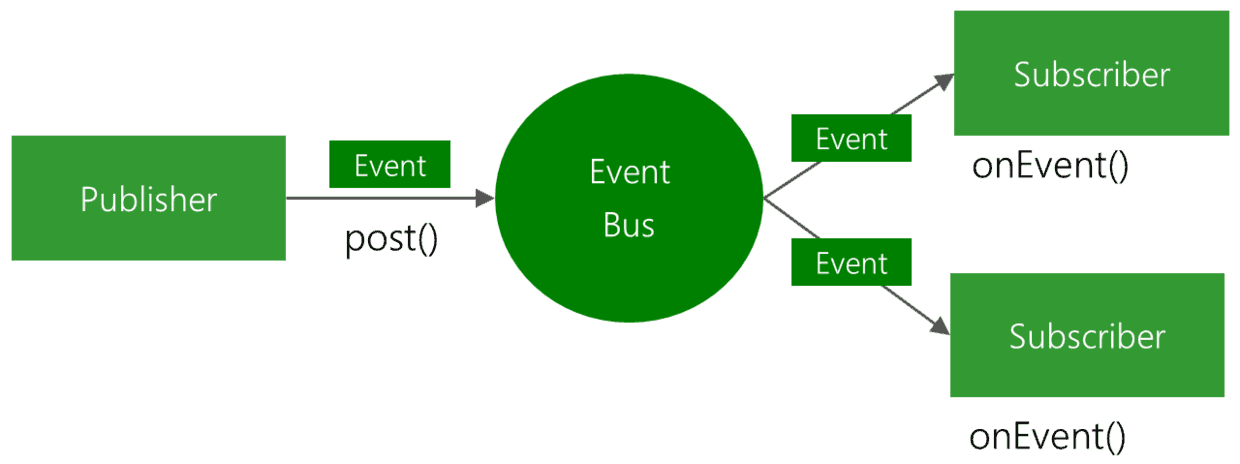
事件的发布者(Publisher)将事件(Event)通过post()方法发送。EventBus内部进行处理,找到订阅了该事件(Event)的事件订阅者(Subscriber)。然后该事件的订阅者(Subscriber)通过onEvent()方法接收事件进行相关处理(关于onEvent()在EventBus 3.0中有改动,下面详细说明)。
demo
注册订阅
1
| EventBus.getDefault().register(this);
|
事件处理
1
2
3
4
5
| @Subscribe(threadMode = ThreadMode.MainThread)
public void onNewsEvent(NewsEvent event){
String message = event.getMessage();
mTv_message.setText(message);
}
|
发布事件
1
| EventBus.getDefault().post(new NewsEvent("我是来自SecondActivity的消息,你好!"));
|
Register
进入getDefault()
1
2
3
4
5
6
7
8
9
10
11
| static volatile EventBus defaultInstance;
public static EventBus getDefault() {
if (defaultInstance == null) {
synchronized (EventBus.class) {
if (defaultInstance == null) {
defaultInstance = new EventBus();
}
}
}
return defaultInstance;
}
|
通过上述代码可以得知,getDefault()中通过双检查锁(DCL)机制实现了EventBus的单例机制,获得了一个默认配置的EventBus对象。
在了解register()之前,先要了解一下EventBus中的几个关键的成员变量。方便对下面内容的理解。
1
2
3
4
5
6
|
private final Map<Class<?>, CopyOnWriteArrayList<Subscription>> subscriptionsByEventType;
private final Map<Object, List<Class<?>>> typesBySubscriber;
private final Map<Class<?>, Object> stickyEvents;
|
下面看具体的register()中执行的代码。
1
2
3
4
5
6
7
8
9
10
11
12
| public void register(Object subscriber) {
Class<?> subscriberClass = subscriber.getClass();
List<SubscriberMethod> subscriberMethods = subscriberMethodFinder.findSubscriberMethods(subscriberClass);
synchronized (this) {
for (SubscriberMethod subscriberMethod : subscriberMethods) {
subscribe(subscriber, subscriberMethod);
}
}
}
|
register()
- 获取订阅者的类类型
- 通过SubscriberMethodFinder类来解析订阅者类,获取所有的响应函数集合
- 遍历订阅函数,执行 subscribe()方法,更新订阅相关信息
继续看subscribe()方法。
subscribe 函数分三步
第一步:
1
2
3
4
5
6
7
8
9
10
11
12
13
14
15
16
17
18
19
20
21
22
23
24
25
26
27
|
Class<?> eventType = subscriberMethod.eventType;
CopyOnWriteArrayList<Subscription> subscriptions = subscriptionsByEventType.get(eventType);
Subscription newSubscription = new Subscription(subscriber, subscriberMethod);
if (subscriptions == null) {
subscriptions = new CopyOnWriteArrayList<Subscription>();
subscriptionsByEventType.put(eventType, subscriptions);
} else {
if (subscriptions.contains(newSubscription)) {
throw new EventBusException("Subscriber " + subscriber.getClass() + " already registered to event "
+ eventType);
}
}
synchronized (subscriptions) {
int size = subscriptions.size();
for (int i = 0; i <= size; i++) {
if (i == size || subscriberMethod.priority > subscriptions.get(i).subscriberMethod.priority) {
subscriptions.add(i, newSubscription);
break;
}
}
}
|
第二步:
1
2
3
4
5
6
7
8
9
|
List<Class<?>> subscribedEvents = typesBySubscriber.get(subscriber);
if (subscribedEvents == null) {
subscribedEvents = new ArrayList<Class<?>>();
typesBySubscriber.put(subscriber, subscribedEvents);
}
subscribedEvents.add(eventType);
|
第三步:
1
2
3
4
5
6
7
8
9
10
11
12
13
14
15
16
17
18
19
20
|
if (subscriberMethod.sticky) {
if (eventInheritance) {
Set<Map.Entry<Class<?>, Object>> entries = stickyEvents.entrySet();
for (Map.Entry<Class<?>, Object> entry : entries) {
Class<?> candidateEventType = entry.getKey();
if (eventType.isAssignableFrom(candidateEventType)) {
Object stickyEvent = entry.getValue();
checkPostStickyEventToSubscription(newSubscription, stickyEvent);
}
}
} else {
Object stickyEvent = stickyEvents.get(eventType);
checkPostStickyEventToSubscription(newSubscription, stickyEvent);
}
}
|
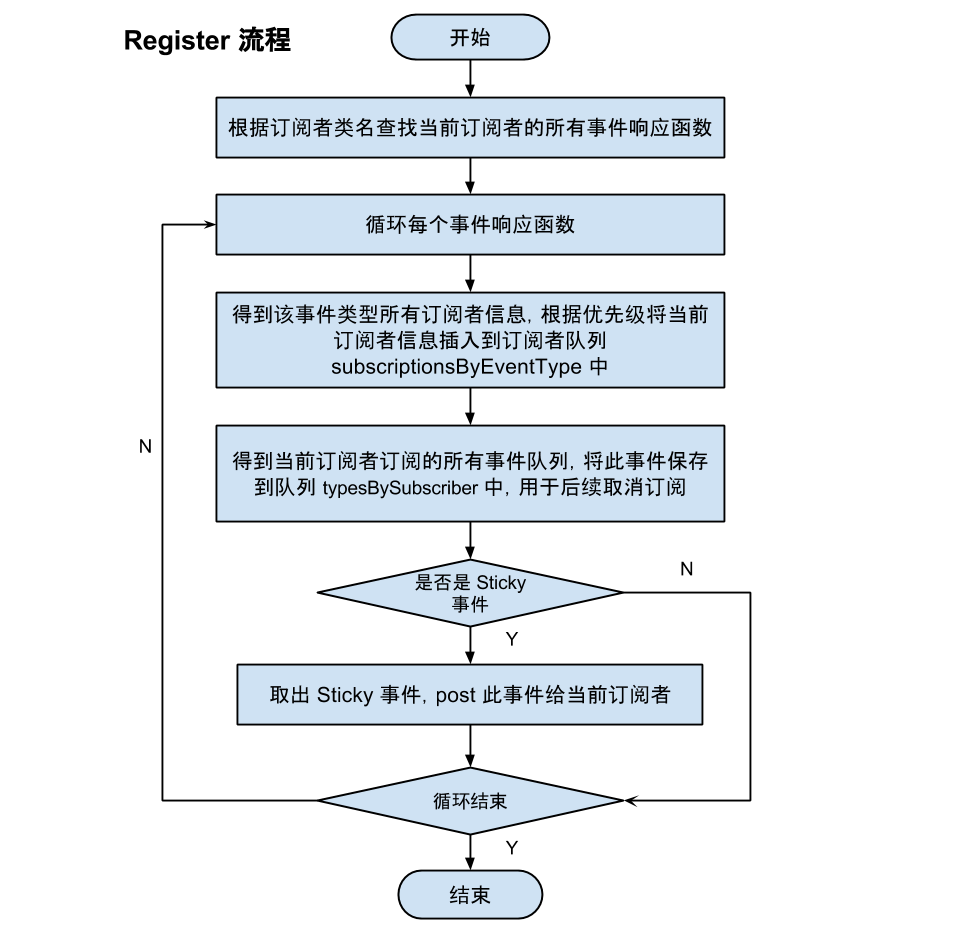
- 通过subscriptionsByEventType得到该事件类型所有订阅者信息队列,根据优先级将当前订阅者信息插入到订阅者队列subscriptionsByEventType中;
- 在typesBySubscriber中得到当前订阅者订阅的所有事件队列,将此事件保存到队列typesBySubscriber中,用于后续取消订阅;
- 检查这个事件是否是 Sticky 事件,如果是则从stickyEvents事件保存队列中取出该事件类型最后一个事件发送给当前订阅者。
以下是订阅的具体流程图:
unRegister
1
2
3
4
5
6
7
8
9
10
11
12
13
14
15
16
17
18
19
20
21
22
23
24
25
26
27
28
29
30
31
| public synchronized void unregister(Object subscriber) {
List<Class<?>> subscribedTypes = typesBySubscriber.get(subscriber);
if (subscribedTypes != null) {
for (Class<?> eventType : subscribedTypes) {
unsubscribeByEventType(subscriber, eventType);
}
typesBySubscriber.remove(subscriber);
} else {
Log.e("EventBus", "Subscriber to unregister was not registered before: "
+ subscriber.getClass());
}
}
private void unsubscribeByEventType(Object subscriber, Class<?> eventType) {
List<Subscription> subscriptions = subscriptionsByEventType.get(eventType);
if (subscriptions != null) {
int size = subscriptions.size();
for (int i = 0; i < size; i ++) {
Subscription subscription = subscriptions.get(i);
if (subscription.subscriber == subscriber) {
subscription.active = false;
subscriptions.remove(i);
i --;
size --;
}
}
}
}
|
unregister()方法比较简单,主要完成了subscriptionsByEventType以及typesBySubscriber两个集合的同步。
Post
1
2
3
4
5
6
7
8
9
10
11
12
13
14
15
16
17
18
19
20
21
22
23
24
25
26
| public void post(Object event) {
PostingThreadState postingState = currentPostingThreadState.get();
List<Object> eventQueue = postingState.eventQueue;
eventQueue.add(event);
if (!postingState.isPosting) {
postingState.isMainThread = Looper.getMainLooper() == Looper.myLooper();
postingState.isPosting = true;
if (postingState.canceled) {
throw new EventBusException("Internal error. Abort state was not reset");
}
try {
while (!eventQueue.isEmpty()) {
postSingleEvent(eventQueue.remove(0), postingState);
}
} finally {
postingState.isPosting = false;
postingState.isMainThread = false;
}
}
}
|
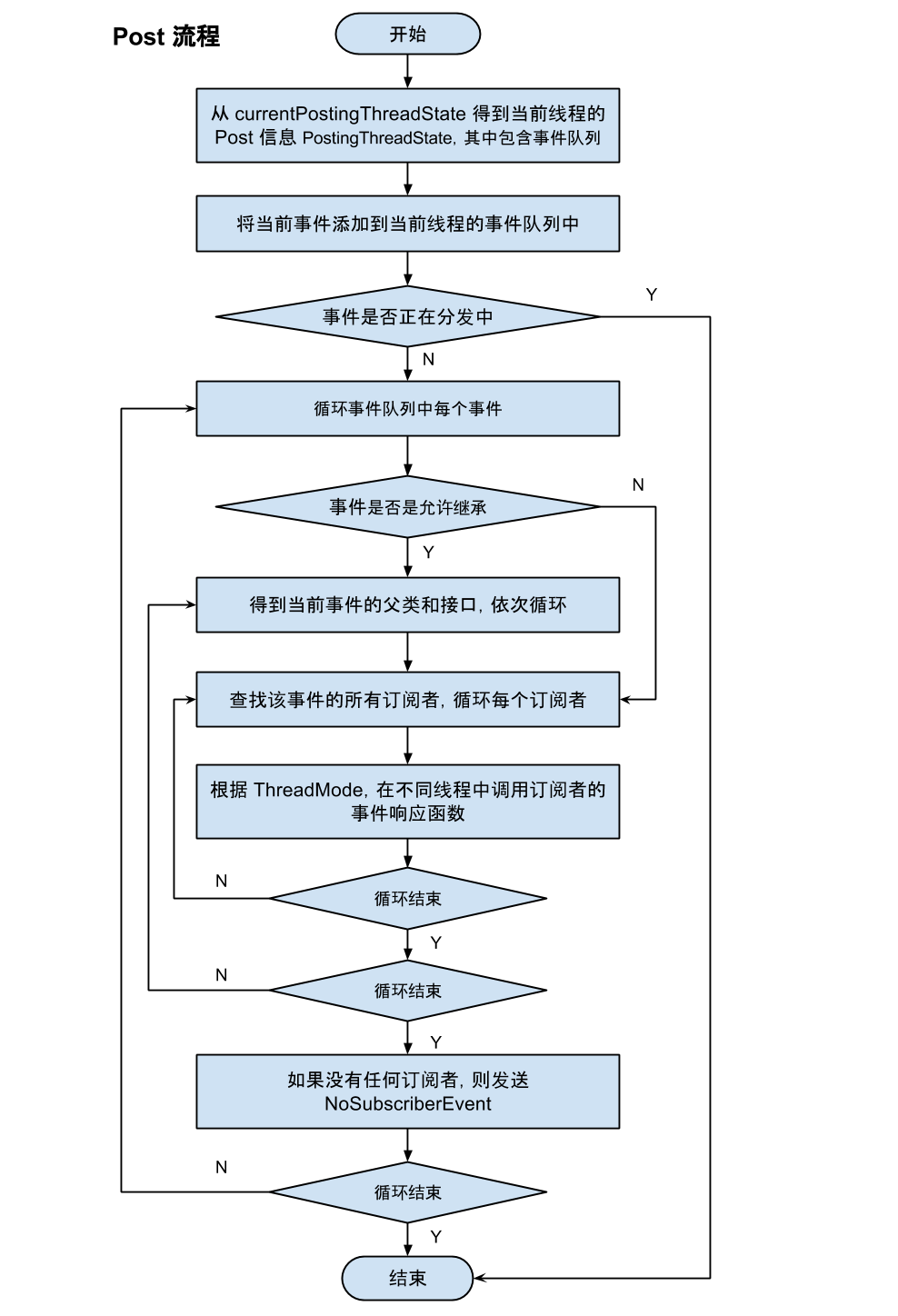
post 函数会首先得到当前线程的 post 信息 PostingThreadState,其中包含事件队列,将当前事件添加到其事件队列中,然后循环调用 postSingleEvent 函数发布队列中的每个事件。
1
2
3
4
5
6
7
8
9
10
11
12
13
14
15
16
17
18
19
| private void postSingleEvent(Object event, PostingThreadState postingState) {
Class<?> eventClass = event.getClass();
boolean subscriptionFound = false;
if (eventInheritance) {
List<Class<?>> eventTypes = lookupAllEventTypes(eventClass);
int countTypes = eventTypes.size();
for (int h = 0; h < countTypes; h ++) {
Class<?> clazz = eventTypes.get(h);
subscriptionFound |= postSingleEventForEventType(event, postingState, clazz);
}
} else {
subscriptionFound = postSingleEventForEventType(event, postingState, eventClass);
}
........
}
|
调用 postSingleEventForEventType 函数发布每个事件到每个订阅者。
1
2
3
4
5
6
7
8
9
10
11
12
13
14
15
16
17
18
19
20
21
22
23
24
25
26
27
28
29
30
| private boolean postSingleEventForEventType(Object event, PostingThreadState postingState,
Class<?> eventClass) {
CopyOnWriteArrayList<Subscription> subscriptions;
synchronized (this) {
subscriptions = subscriptionsByEventType.get(eventClass);
}
if (subscriptions != null && !subscriptions.isEmpty()) {
for (Subscription subscription : subscriptions) {
postingState.event = event;
postingState.subscription = subscription;
boolean aborted = false;
try {
postToSubscription(subscription, event, postingState.isMainThread);
aborted = postingState.canceled;
} finally {
postingState.event = null;
postingState.subscription = null;
postingState.canceled = false;
}
if (aborted) {
break;
}
}
return true;
}
return false;
}
|
调用 postToSubscription 函数向每个订阅者发布事件。
postToSubscription 函数中会判断订阅者的 ThreadMode,从而决定在什么 Mode 下执行事件响应函数。这里就不贴源码了。后续还牵着到反射以及线程调度问题,这里就不展开了。
1
2
3
4
5
6
7
8
9
10
11
12
13
14
15
16
17
18
19
20
21
22
23
24
25
26
27
28
29
30
31
32
33
34
35
| private void postToSubscription(Subscription subscription, Object event, boolean isMainThread) {
switch (subscription.subscriberMethod.threadMode) {
case POSTING:
invokeSubscriber(subscription, event);
break;
case MAIN:
if (isMainThread) {
invokeSubscriber(subscription, event);
} else {
mainThreadPoster.enqueue(subscription, event);
}
break;
case MAIN_ORDERED:
if (mainThreadPoster != null) {
mainThreadPoster.enqueue(subscription, event);
} else {
invokeSubscriber(subscription, event);
}
break;
case BACKGROUND:
if (isMainThread) {
backgroundPoster.enqueue(subscription, event);
} else {
invokeSubscriber(subscription, event);
}
break;
case ASYNC:
asyncPoster.enqueue(subscription, event);
break;
default:
throw new IllegalStateException("Unknown thread mode: " + subscription.subscriberMethod.threadMode);
}
}
|
其中mainThreadPoster是一个Handler。
下面是具体的post的流程图